| May 28,
2004 - WHAT'S NEW |
- Keep Windows Updated
- Wireless Giveaway
- Meet your Tech Support Team
- Refer Your Friends
- Find Stuff on the web
- Flatscreen Winner
|
LOW PRICED DSL NOW HERE |

|
TRY
SURFXCELLERATOR! |

|
FREE
SCREENSAVER - PC |
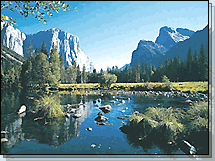
CLICK TO DOWNLOAD THE LAKES SCREENSAVER
Can't make up north this summer? You'll find
reflections of nature's beauty in the peaceful calm of this Lakes Screensaver. |
FREE
DESKTOP WALLPAPER
PC or MAC |

800x600 | 1024x768
It's everyone's favorite ogre - and his Donkey!
Windows Users: Click the resolution appropriate for your monitor size. Click
the image with the right mouse button. On the pop-up menu, select "Set as
Wallpaper" to save the image as your desktop background.
Macintosh Users: Click the resolution appropriate for your monitor size. Click and
hold on the image and choose "Save Image As..." Then go to your Appearance
control panel and click on the Desktop tab. Click on the Place Picture and select the
downloaded picture file on your hard drive. Click Set Desktop. |
CONTACT
INFORMATION |

4050 Olson Memorial Highway
Suite 125
Golden Valley, MN 55422
Phone: 763-521-0401
Toll-Free: 1-800-300-4256
Fax: 763-521-0402
Email: info@usfamily.net
URL: www.usfamily.net
|
|
| TECH TIP - KEEP
WINDOWS UPDATED |
Protect against viruses
and worms!
 Keeping windows up to date is an important part of
virus defense and system maintenance. Microsoft releases important updates for
Windows which fix security flaws that viruses can exploit to infect your computer. Keeping windows up to date is an important part of
virus defense and system maintenance. Microsoft releases important updates for
Windows which fix security flaws that viruses can exploit to infect your computer.
You will also find updates that add new
functionality to Windows or fix other known problems. It is a good idea to check the
Windows Update web site at least once per week. You will find there are several
categories of updates, the most important is the "Critical Updates" category,
which contains new security updates.
You can download these important updates for
FREE by visiting: www.windowsupdate.com.
|
WIRELESS
SYSTEM GIVEAWAY |
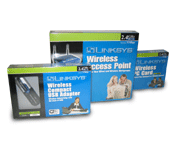 USFamily.Net
& Computer Renaissance are teaming up for another giveaway - a FREE wireless system
for your computer. USFamily.Net
& Computer Renaissance are teaming up for another giveaway - a FREE wireless system
for your computer.
NO PURCHASE NECESSARY! Click here to enter our FREE giveaway
|
| YOUR TECH SUPPORT
TEAM |
Meet Todd M.
 Todd lives in Oakdale, MN. Todd wears shorts,
sandals and Hawaiian shirts to the office every day of the year - even in the dead of
Winter! Todd is starting his own computer repair business on the side - Aloha
Computing. Todd lives in Oakdale, MN. Todd wears shorts,
sandals and Hawaiian shirts to the office every day of the year - even in the dead of
Winter! Todd is starting his own computer repair business on the side - Aloha
Computing. |
| REFER YOUR FRIENDS |
FREE Computer for New Users
 Every new person that signs up for USFamily.Net service
(dial-up, SurfXccelerator, or DSL) from now until June 30, 2004 will be automatically
entered into a sweepstakes to win a full computer system - compliments of USFamily.Net and
Computer Renaissance. Every new person that signs up for USFamily.Net service
(dial-up, SurfXccelerator, or DSL) from now until June 30, 2004 will be automatically
entered into a sweepstakes to win a full computer system - compliments of USFamily.Net and
Computer Renaissance. Click here to refer your friends today!
|
| FIND STUFF ON THE WEB |
USFamily.Net makes it easy to surf the web
Having a hard time finding something online? Then fret no more. USFamily.Net
has just updated our "Popular Links" page. We
have added new links directly to websites of interest for all of our customers, including
links to search engines, news sites, sports sites, local sites, online shopping and sites
for kids. If you have a link you would like to add to this page, please email it to
us for consideration.
You can start surfing the web with less hassles by clicking
on the "popular links" link on our homepage, or - click here to visit our popular links page
directly. |
| CONGRATULATIONS |
Flatscreen Giveaway Winner
 Congratulations to Dan J. of St. Anthony. Dan
was one of 4388 people who entered our sweepstakes. He is the winner of a 15"
Flatscreen computer monitor, courtesy of Computer Renaissance & USFamily.Net. Congratulations to Dan J. of St. Anthony. Dan
was one of 4388 people who entered our sweepstakes. He is the winner of a 15"
Flatscreen computer monitor, courtesy of Computer Renaissance & USFamily.Net. |
|
You have received this email because you are
listed as a current USFamily.Net customer and selected the option to receive USFamily.Net
email tips and newsletters. To change this option: go to "My Account", Update Name, address, phone, and email
tips. |